China Best P2.5 LED Display What Is the Viewing Distance?

Time:2026-09-24 Author:Oliver
0%

A P2.5 LED display uses a 2.5-millimeter pixel pitch, creating a clear image at relatively close range. This makes it popular for conference rooms, retail stores, control rooms, studios, and indoor advertising. Yet one question appears repeatedly: “What is the viewing distance for a P2.5 LED display?”

A practical starting point is about 2.5 meters, based on the pixel-pitch rule. At this distance, individual pixels usually blend into a smoother picture. Many viewers may prefer three to five meters for comfortable, detailed viewing. The best result still depends on screen size, brightness, content, camera use, and installation height.

LED display consultant David Chen explains, “Viewing distance is not one fixed number; it depends on pixel pitch, content, and viewer comfort.” His comment reflects real installation experience. A large screen viewed from the front row can feel different from a smaller screen mounted above eye level.

Look closely.

At two meters, text may appear sharp, but pixel structure can remain visible to some viewers. At four meters, video often looks more natural. Fine fonts, spreadsheets, and product details may require a closer pitch or greater distance. Brightness also matters. Excessive brightness can cause eye strain, even when the pixel pitch is suitable.

This guide examines P2.5 viewing distance through practical measurements and application needs. The common formula helps, but it is not perfect. Room lighting, audience movement, and personal vision can change the final decision. Testing a sample panel before purchase remains the most reliable approach.
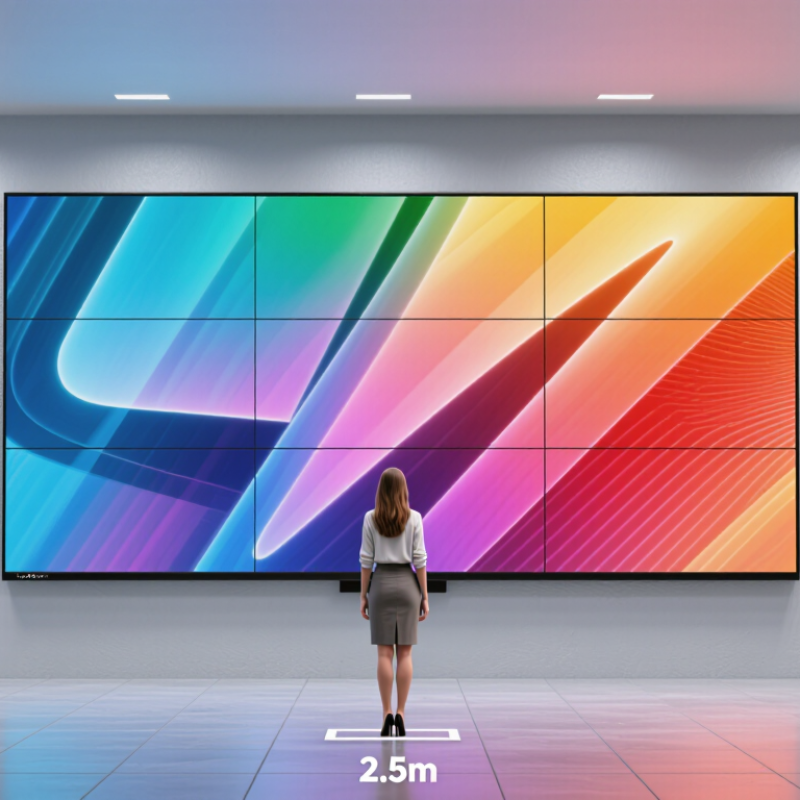
China Best P2.5 LED Display What Is the Viewing Distance?

What Is a P2.5 LED Display?

A P2.5 LED display has 2.5 millimeters between the centers of neighboring pixels. This pixel pitch determines image sharpness, viewing comfort, and the practical installation distance. Smaller gaps create finer images, while larger gaps usually reduce cost and suit distant audiences.

For a P2.5 screen, the minimum viewing distance is commonly around 2.5 meters. Many viewers see more natural images from three to five meters away. At closer distances, individual pixels may become visible, especially in text or high-contrast graphics. However, there is no universal number. Content type, screen size, brightness, eyesight, and camera distance can change the result. In real projects, technicians should inspect sample content from the audience area before final installation. A simple formula helps, but it is not perfect.

Tips: Place a printed text test and moving video on the screen. Stand at several distances, including the nearest expected viewer position. Check faces, small fonts, and dark scenes. Reduce excessive brightness, which can cause eye strain and make images look harsh. Indoor lighting also matters. A P2.5 display may perform well in a meeting room, retail space, or control area, yet still need careful calibration. Measure twice. Then decide.

How Is P2.5 Pixel Pitch Related to Viewing Distance?

P2.5 pixel pitch means each LED cluster is spaced 2.5 millimeters from the next. This distance directly affects image sharpness and comfortable viewing. A widely used engineering rule places the minimum viewing distance near the pixel pitch in meters. Therefore, a P2.5 LED display may look acceptable from about 2.5 meters away. At closer range, viewers may notice individual pixels or slight image texture.

The practical viewing distance is often 2.5 to 3 times the pitch. For P2.5, that suggests approximately 6.25 to 7.5 meters for smoother images. This is a guide, not a law. Content type changes the result. Fine text needs more distance than bold video graphics. Brightness, camera exposure, refresh rate, and viewing angle also matter. A crowded showroom feels different from a dark auditorium.

SMPTE EG 18-1994 uses a 30-degree horizontal viewing angle for critical screen evaluation, while ITU-R BT.2020 defines detailed image and resolution requirements for high-quality video systems. These references support a geometry-based approach, but neither creates one universal LED distance formula. My field experience suggests testing a real sample at 2.5, 5, and 7 meters. The middle point may look best. Yet that assumption can fail when viewers read small data tables. A P2.5 screen is not automatically ideal for every room.

P2.5 LED Display: How Pixel Pitch Relates to Viewing Distance

A common rule of thumb estimates the minimum comfortable viewing distance in meters as roughly equal to the pixel pitch in millimeters.

For a P2.5 display, this rule suggests about 2.5 meters (8.2 feet). Actual viewing comfort varies with content, display brightness, and individual perception; this is a guideline, not a fixed requirement.

What Is the Recommended Viewing Distance for P2.5 LED Screens?

For a P2.5 LED display, the recommended viewing distance usually starts at about 2.5 meters. The 2.5-millimeter pixel pitch allows viewers to see detailed images without noticing individual pixels easily. In a meeting room, retail space, or reception area, 3 to 5 meters often feels more comfortable. At this range, text appears cleaner, faces look natural, and motion feels less distracting.

Room conditions can change the answer. A viewer standing 2 meters away may notice slight pixel structure, especially in bright white areas or large text. At 4 meters, the image normally looks smoother. I have found that viewing angle matters too. People seated far to the side may see reduced contrast before they notice pixel gaps. Screen height, brightness, and content design also affect comfort. Fine text needs more distance than simple video.

There is no perfect number. A dark room may support closer viewing, while strong ambient light can require more brightness and greater spacing. Installers should place temporary content on the screen and test it from real seating positions. Walk around. Check small text, skin tones, and fast movement.

One overlooked issue is camera use: filming from too close can reveal scan lines or moiré patterns, even when the display looks excellent in person. For many indoor installations, 2.5 to 6 meters is a practical working range, but the final distance should follow the room’s actual layout and audience behavior.

Which Factors Affect P2.5 LED Display Viewing Distance?

China Best P2.5 LED Display: What Is the Viewing Distance?

A P2.5 LED display has a 2.5-millimeter pixel pitch. Its comfortable viewing distance usually starts at about 2.5 meters. Many installations look sharp between 3 and 8 meters, but this range is not universal. A close viewer may notice pixel structure, especially in text or detailed graphics. In real projects, viewing distance should be checked from the nearest seating position, not only from the room’s center.

Several factors affect the result. Pixel pitch is important, but screen size also matters. A large display viewed too closely can feel overwhelming, even when individual pixels appear clear. Content design changes perception too. Small fonts need more distance and stronger contrast. Brightness, ambient light, viewing angle, and the viewer’s eyesight also influence comfort. A display in a bright exhibition hall may need higher brightness, while excessive brightness can cause eye fatigue indoors. There is no perfect formula. Calculation helps, but field testing remains necessary.

Tips: Place a sample image on the screen before installation. Check fine text, skin tones, and moving scenes from the closest and farthest seats. Ask several viewers for feedback, because one person’s comfortable distance may feel uncomfortable to another. Keep the camera position in mind too; moiré patterns may appear during filming, even when the display looks normal in person. Pixel pitch guides the decision, but actual room conditions should make the final call.

How Can You Choose the Right P2.5 LED Display?

Choosing the right P2.5 LED display starts with the room, not the screen size. P2.5 means a 2.5-millimeter pixel pitch. In practice, viewers usually need about 2.5 meters for a comfortable image. Closer viewing may reveal pixel structure. Measure the nearest seat carefully.

Consider how people will use the display. Retail shoppers may stand near the screen, so smooth text and product details matter. A conference room needs clear charts, faces, and small labels. For a 4-meter-wide wall, calculate the pixel dimensions before ordering. This prevents stretched layouts and unreadable content. Do not rely on a supplier’s standard cabinet size alone.

Brightness should match the environment. Indoor displays often need less brightness than sunlit entrances. Excessive brightness can cause eye discomfort and waste energy. Ask for front and side viewing tests. Check whether colors remain consistent from the room’s corners. High refresh rates help when cameras record the screen, especially during events. Fine installation work also matters. Uneven cabinets can create visible lines, even with excellent modules.

A site survey is worth the time. Check power capacity, ventilation, wall strength, and maintenance access. I have seen projects focus on pixel pitch while ignoring service space behind the display. That mistake becomes expensive later. P2.5 is not automatically the best choice. A smaller pitch may help close viewing, but it can increase cost without improving the actual experience. Request a sample image at real viewing distance before making the final decision.

FAQS

What does P2.5 pixel pitch mean?

It means neighboring LED clusters are 2.5 millimeters apart. This spacing affects image detail and comfortable viewing distance.

How close can viewers sit to a P2.5 display?

A common starting point is about 2.5 meters. Closer viewers may notice individual pixels, especially in bright areas or large text.

What viewing distance usually looks comfortable?

Around 3 to 5 meters often works well indoors. At 4 meters, images generally appear smoother, though each room behaves differently.

Is 2.5 meters always the right viewing distance?

No. Fine text, room lighting, screen height, and viewing angle can change what feels comfortable. Test it in the actual room.

How should a team test a P2.5 screen before installation?

Show real content and check it from nearby seats and room corners. Look at small text, faces, and fast movement. Walk around.

What should be checked when choosing a display for a meeting room?

Check chart labels, pixel dimensions, brightness, and side viewing. A four-meter-wide wall still needs content sized for its resolution.

Can a display look different on camera?

Yes. Filming too close may reveal scan lines or moiré patterns, even if the screen looks clear in person. That can be surprising.

What installation details are easy to overlook?

Check power capacity, ventilation, wall strength, and maintenance access. I have seen service space behind the screen get missed. It matters later.

Is P2.5 automatically the best choice for every room?

No. A smaller pitch may help very close viewers, but it can add cost without improving the experience. Test before deciding.

Conclusion

A P2.5 LED display has a 2.5 mm distance between the centers of neighboring pixels, making it suitable for indoor settings where viewers need clear images at relatively close range. What is the viewing distance for a P2.5 LED display? A useful starting point is around 2.5 meters, but this is a guideline rather than a fixed rule. Pixel pitch helps estimate how close an audience can sit before individual pixels become noticeable; the best distance also depends on the content and viewing conditions.

When choosing a P2.5 screen, consider its size, resolution, brightness, image content, installation environment, and the audience’s typical viewing position. Text-heavy presentations may benefit from a closer, sharper view, while video shown to a larger audience may call for more distance. Evaluate the space and intended use together to select a display that provides comfortable, clear viewing.

Oliver

Oliver

Oliver is a seasoned marketing professional with a wealth of expertise in driving brand awareness and engagement. With a deep understanding of our company's product offerings, he consistently delivers high-quality content that enriches our professional blog. His insights not only shed light on......